# Running your first Test Set
In order to run a Test Set:
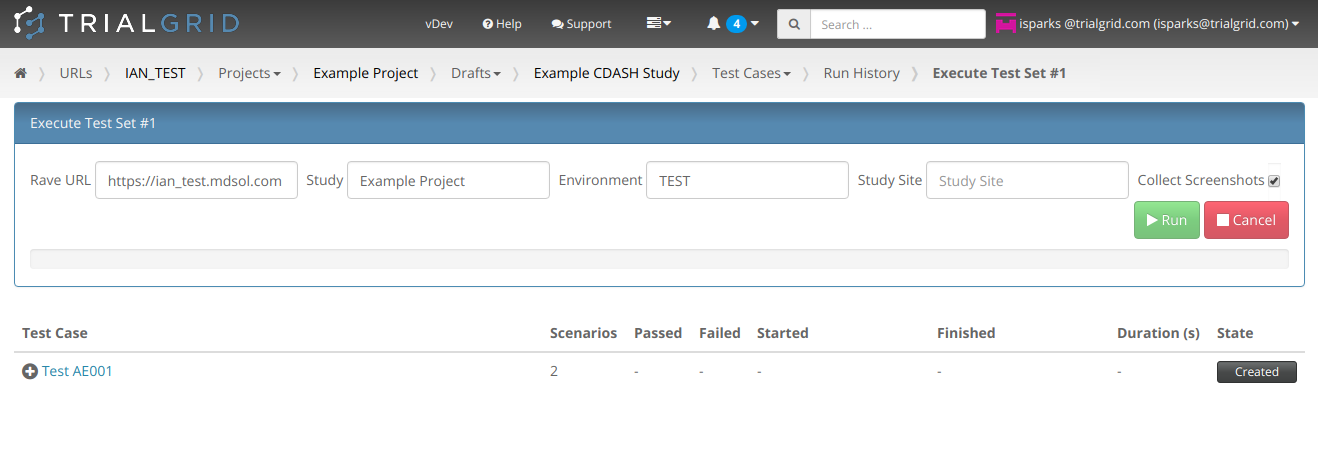
You will need:
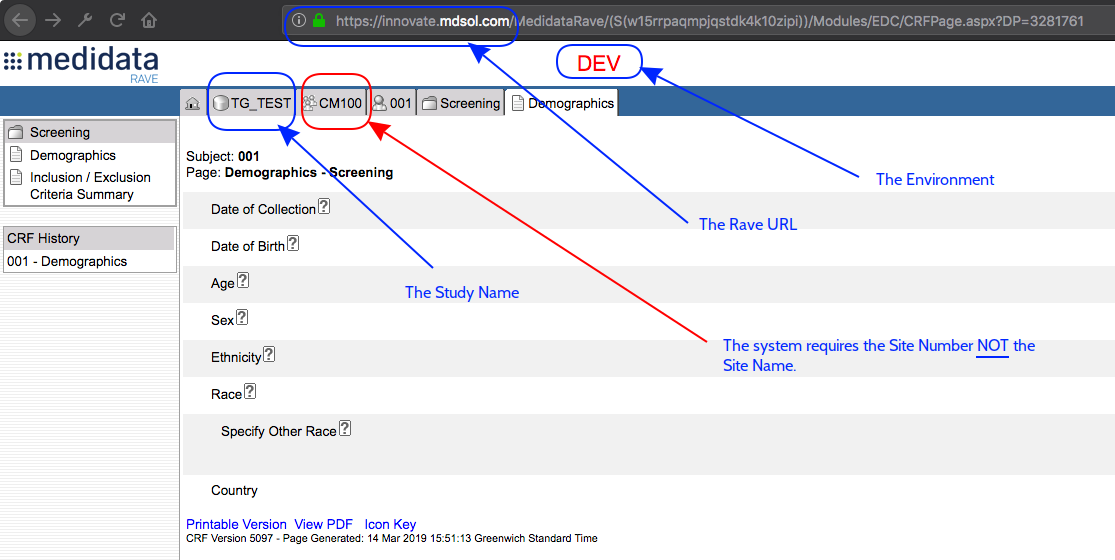
1. The Rave URL to enter data into. This will usually be `https://X.mdsol.com` where X is the name of the Rave URL For example: `https://innovate.mdsol.com` or `https://client1.mdsol.com`
2. The name of the Study/Project in the Rave URL to enter data into.
3. The Environment that data should be entered into.
4. The Site Number (note: **not** Name) that Subjects will be created in. You may need to look up the Site Number in the site admin module of Medidata Rave.
Some of this information can be taken directly from Rave:
**Rave Classic Users**
You will also need credentials for users with the roles referenced in your tests. For example, the background section of this test uses the role "Investigator":
```gherkin
Background:
Given I am logged in with role "Investigator"
And a subject exists
```
To run this test will need user credentials for a user with the role "Investigator" which exists **as a Rave Classic account** in this URL.
> **Important:** The Automated Test runner uses Rave Web Services to enter data into Rave in the role of a particular user. Rave Web Services can only enter data using a Rave Classic Account (**not** an iMedidata account). It is also important that all Rave Classic Accounts provided have data entry access to the TG_UAT study and TG_UAT site in your Rave URL. See [Setup](automated_testing_initial_setup.html.md#automated-testing-initial-setup).
**Subject Admin Users**
Some tests require that Folder/Form combinations exist. For example:
```gherkin
Background:
Given I am logged in with role "Investigator"
And a subject exists
And form "AE" exists in folder "AE_FOLDER"
```
This test requires that the AE form exists in the AE_FOLDER. In order to ensure this the Automated Test runner will try to create that Form in that Folder using Subject Admin if it does not already exist. A set of user credentials (username/password) for a Rave Classic account with Subject Admin rights will also be required to run this test. It may be the same credentials as required for an EDC role reference (e.g. a Data Manager).
**iMedidata Users for Rave EDC**
Finally, if the test is to be executed on Rave EDC and you wish to collect screenshots of Rave EDC screens as evidence then iMedidata credentials will also be required. These will repeat the roles as for Rave Classic account (e.g. for Investigator). The Automated Test runner can enter data via Rave Web Services using the Rave Classic Account but cannot use this account to collect screenshots from Rave EDC which is controlled via iMedidata - it needs a role linked to an iMedidata account with access to the study in order to do that.